Decoding images#
In this example, we’ll learn how to decode an image into a PyTorch tensor using
decode_image(). It supports JPEG, PNG, WebP, GIF,
AVIF and HEIC, and automatically detects the format for you. You can also call
any of the format-specific decoders directly, as they expose more fine-grained
options (like CUDA decoding with decode_jpeg()).:
decode_jpeg()for CPU and CUDA
Note
These decoders supersede the ones from torchvision.io: they are more
robust and support more features. See
Migrating from TorchVision to TorchCodec for a
migration guide.
First, a bit of boilerplate: we’ll download an image from the web and define a plotting utility. You can ignore that part and jump right below to Decoding an image.
import torch
import requests


url = "https://raw.githubusercontent.com/meta-pytorch/torchcodec/refs/heads/main/docs/source/_static/thumbnails/pigeon_decoding.jpeg"
response = requests.get(url, headers={"User-Agent": ""})
if response.status_code != 200:
    raise RuntimeError(f"Failed to download image. {response.status_code = }.")

raw_image_bytes = response.content


def plot(image: torch.Tensor):
    try:
        from torchvision.transforms.v2.functional import to_pil_image
        import matplotlib.pyplot as plt
    except ImportError:
        print("Cannot plot, please run `pip install torchvision matplotlib`")
        return

    pil_image = to_pil_image(image)
    fig = plt.figure(figsize=(pil_image.width / 100, pil_image.height / 100))
    ax = fig.add_axes([0, 0, 1, 1])
    # cmap only kicks in for single-channel (grayscale) images.
    ax.imshow(pil_image, cmap="gray")
    ax.axis("off")
Decoding an image#
decode_image() accepts the raw (encoded) bytes, a
path to a local file, or a torch.Tensor of encoded bytes. The format is
detected automatically from the content, so the same call works for a JPEG, a
PNG, a WebP, etc.
from torchcodec.decoders import decode_image

image = decode_image(raw_image_bytes)
# You can also pass a path to a local file: decode_image("image.jpg")

print(f"{image.shape = }")
print(f"{image.dtype = }")
plot(image)

image.shape = torch.Size([3, 222, 234])
image.dtype = torch.uint8
The decoded image is a torch.Tensor of shape (C, H, W) where C is
the number of channels, H the height and W the width. By default images are
decoded as RGB (3 channels) with torch.uint8 values.
Choosing the color mode#
The mode parameter controls the number and meaning of the output channels.
It can be "RGB" (the default), "GRAY", "RGB_ALPHA", and a few more.
gray = decode_image(raw_image_bytes, mode="GRAY")
print(f"{gray.shape = }")  # single channel
plot(gray)
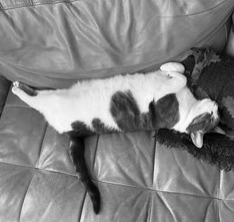
gray.shape = torch.Size([1, 222, 234])
Controlling the output dtype#
The output_dtype parameter controls the dtype of the returned tensor. It
can be torch.uint8 (the default), torch.uint16, or "auto".
image_16bit = decode_image(raw_image_bytes, output_dtype=torch.uint16)
print(f"{image_16bit.dtype = }")
# .max() isn't implemented for uint16, so we cast to a wider int just to print.
print(f"{image_16bit.to(torch.int32).max() = }")  # scaled up to the 16-bit range
image_16bit.dtype = torch.uint16
image_16bit.to(torch.int32).max() = tensor(65535, dtype=torch.int32)
For 8-bit formats like JPEG, WebP and GIF, torch.uint16 simply scales the
8-bit values up to the full 16-bit range (0-255 -> 0-65535). Formats that can
carry more than 8 bits per channel (PNG, AVIF, HEIC) actually preserve that
extra precision when you pass torch.uint16 or "auto".
Decoding animated images#
GIF, WebP and AVIF can hold a sequence of frames (an animation). In that
case decode_gif(),
decode_avif(), and
decode_heic() return an (N, C, H, W) tensor,
with one frame per animation frame, instead of the (C, H, W) you get for a
still image.
Decoding JPEGs on GPU#
decode_jpeg() can decode directly on a CUDA device
by passing device="cuda". For best performance, decode a whole batch in
a single call by passing a list of sources: the entire batch is then decoded
in one nvJPEG call, which is much faster than decoding images one at a time.
from torchcodec.decoders import decode_jpeg

# A single image, decoded on the GPU:
image = decode_jpeg(raw_image_bytes, device="cuda")

# A whole batch in one call (much faster than one-by-one):
images = decode_jpeg([img_0, img_1, img_2], device="cuda")
Total running time of the script: (0 minutes 0.157 seconds)