Auto-tuning decoding performance: hill-climbing with an agent#
You can hill-climb (or auto-tune) video decoding tasks with the TorchCodec low-level APIs!
TL;DR: we had an agent write a video decoding pipeline from scratch and hill-climb its
throughput with TorchCodec. With the low-level APIs, it ended up 1.4–1.9x
faster than a simple baseline, and up to 1.36x faster than an equally tuned
VideoDecoder, because the low-level APIs expose more knobs. The knobs
come in two families: per-clip decoding (decode only the packets the target
frames need, resize before color conversion) and pipeline layout (how many
threads read, demux, decode and convert, and how the work is split between
them). Which knob matters most depends on the workload and the hardware.
This tutorial doesn’t prescribe a pipeline. Our results come from one setup, and on a different setup, the best knobs will be different. We encourage you to hill-climb on your own setup!
The setup#
The pipeline to optimize decodes clips from a list of video files, resizes
them to 256x256 and normalizes pixel values to [0, 1], returning float
RGB on the CPU or the GPU. Clips are sampled in two ways: sparse sampling (16
frames per video, roughly equally spaced) and dense sampling (4 clips of 16
consecutive frames per video). The agent is in charge of writing its own
data-loader. The videos are synthetic H.264 from 320p to 1080p. In terms of
hardware, we used a CPU-only machine (96-core AMD, restricted to 4–96 CPUs)
and an A100 machine (restricted to 2–22 CPUs, 5 NVDEC engines). Everything
runs on free-threaded Python 3.14t.
Per-clip knobs#
Here, the agent optimizes the time it takes to decode each clip, keeping the pipeline layout fixed.
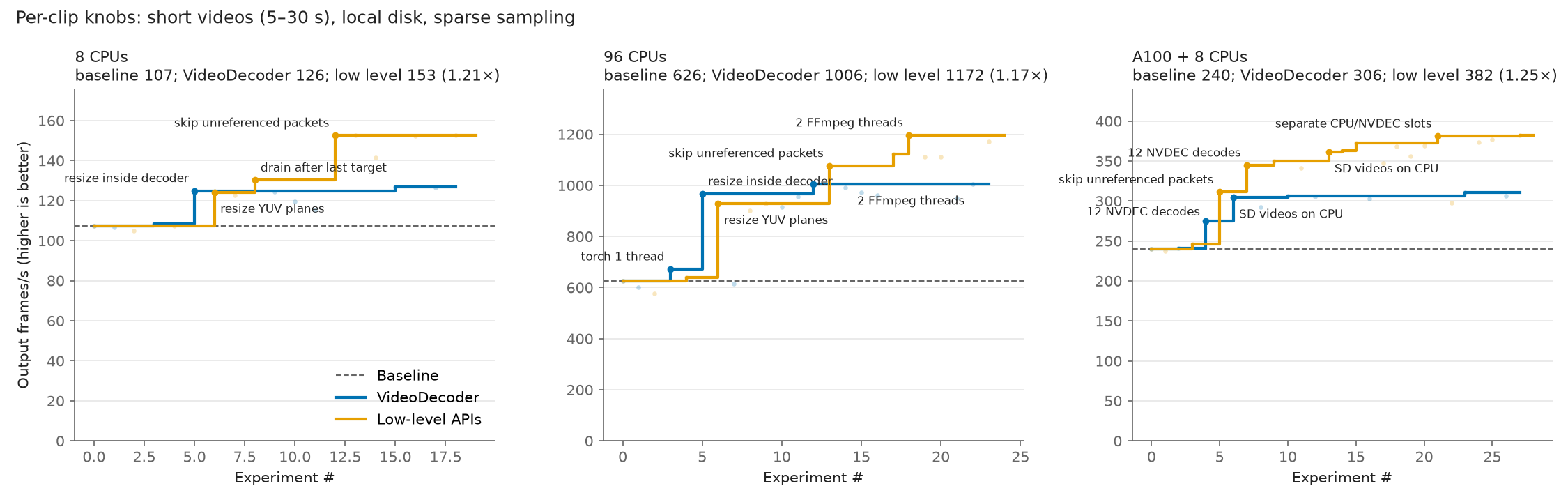
Best knobs:
Dropping packets that no target frame needs (+16–26%). To get to a target frame
T, the decoder starts at the GOP’s keyframeIand must decode every frame thatTdepends on. But it doesn’t need to decode all the frames betweenIandT. In this GOP, eachPframe references the one before it, and the lowercasebframes aren’t referenced by anything, so everybframe exceptTcan be skipped:decode order: I P b b P b b P b b P T decoded: Y Y N N Y N N Y N N Y Y
About 25% of packets can be skipped! To know which ones, the agent parses the H.264 header in
Packet.data, which is only exposed by the low-level APIs.VideoDecodercould do this internally, but it would need a header parser for every codec it supports. The low-level APIs exist for exactly this: codec-specific tricks can live in user code, andVideoDecoderstays simple.Resizing on YUV, before color conversion to RGB (+15% on 8 CPUs, +44% on 96, for both tracks). Both
VideoDecoderand the low-level APIs can do it. ButVideoDecoder’sResizeis always bilinear, while the low-level APIs allow the agent to implement any resize it wants (at its own risk!).
Layout knobs#
Here, the agent keeps the per-clip work fixed, and optimizes the pipeline layout: how many threads read, demux, decode, and convert, and what passes between them (whole videos, GOPs of packets, or raw frames). Both tracks start from one video per thread.
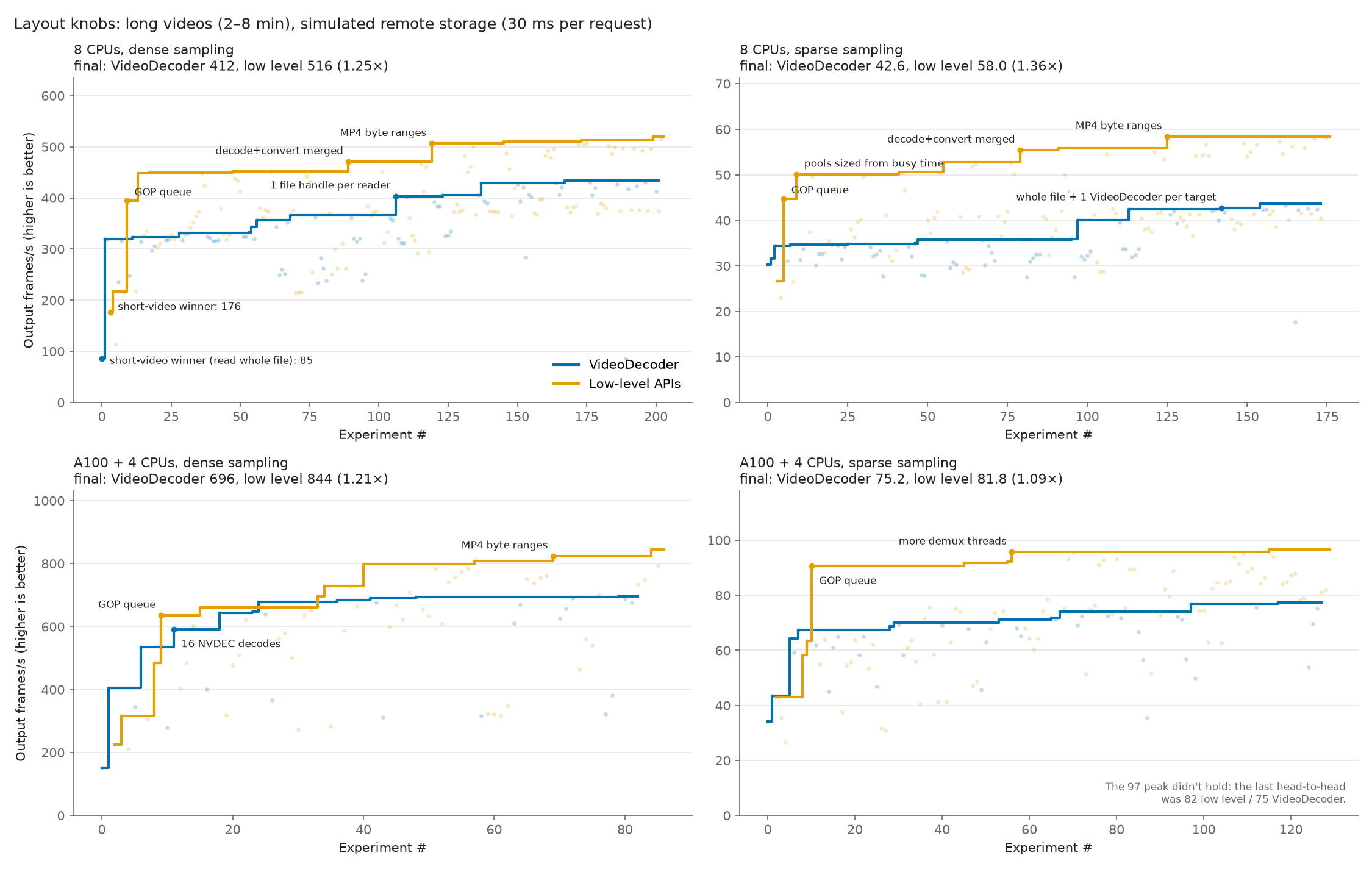
Best knobs:
Handing out work per GOP instead of per video (1.3–1.4x on 8 CPUs). A naive layout gives each video to one thread, which demuxes, decodes and converts all of its clips one after the other. That’s mostly all of what a
VideoDecodercan do. Instead, with the low-level APIs, the work of a video can be split up: demux threads cut each video into GOPs (~1 GOP per clip) and push them onto a shared queue. One decoding worker per CPU then decodes and converts whichever GOP is next, from any video. This helps when videos cost very different amounts to decode (e.g. different resolutions, or how far a target frame is from its keyframe).Below is the decoding work of 2 threads, where the GOPs of video
Atake 3x longer to decode than those ofBandC(A3is the 3rd needed GOP ofA):One video per thread: thread 1: A1------ A2------ A3------ A4------ thread 2: B1 B2 B3 B4 C1 C2 C3 C4 .. .. .. .. <- idle GOP queue: thread 1: A1------ A3------ B1 B3 C1 C3 thread 2: A2------ A4------ B2 B4 C2 C4 <- done sooner
Worth noting that this win depends on the benchmark setup, where we’re decoding a finite and fairly small set of videos. In a steady stream of videos, more videos would keep arriving and thread 2 would just start on the next one. But this split is part of what enables the next win:
Automatically sizing the thread pools. The agent timed how long each stage spends working, gave each pool threads in proportion, and checked that no queue was always full or always empty.
Prefetching exactly the right bytes with a header-only scan (+5–8%). We simulated remote storage, where every read request pays a latency cost. The usual trick to amortize the cost is to read big chunks at once. The baseline used a crude heuristic of pre-fetching fixed 8 MiB blocks, which downloads far more than the GOPs need. The agent replaced it by writing its own MP4 parser to build a per-video frame index, allowing it to know exactly what to pre-fetch and reading 10x fewer bytes than the naive heuristic.
This frame index is essentially what
VideoStream.scan()returns (timestamps and keyframe flags for every packet), but the agent builds it from the header alone, whilescan()requires reading every packet of the file.This was available to both the low-level APIs and the
VideoDecoder.Decoding and converting in the same worker (+4–10%), instead of separate decoding and conversion pools with a queue between them. This might seem surprising on the CPU, where color conversion is usually expensive, but here the frames are resized to 256x256 before conversion, so conversion is much cheaper.
VideoDecoder climbed too, mostly through reading: one file handle per
reader instead of a shared one (+13–45%), more workers to cover read waits,
and the same MP4 byte ranges.
Hill-climb on your own setup#
This tutorial doesn’t prescribe a pipeline. Our results come from one setup: synthetic H.264 videos, simulated remote storage, and a GPU with no training job competing for it or for the CPUs that feed it. On a different setup, the best knobs will be different. The point is that TorchCodec exposes knobs an agent can tune efficiently, so we encourage you to hill-climb (or auto-tune) on your own setup!
To get started, see Build your own decoding pipeline and Multi-threaded decoding pipelines.
Total running time of the script: (0 minutes 0.000 seconds)