Decoder Transforms: Applying transforms during decoding#
In this example, we will demonstrate how to use the transforms parameter of
the VideoDecoder class. This parameter allows us
to specify a list of torchcodec.transforms.DecoderTransform or
torchvision.transforms.v2.Transform objects. These objects serve as
transform specifications that the VideoDecoder
will apply during the decoding process.
First, a bit of boilerplate, definitions that we will use later. You can skip ahead to our Our example video or Applying transforms during pre-processing.
import torch
import requests
import tempfile
from pathlib import Path
import shutil
from time import perf_counter_ns


def store_video_to(url: str, local_video_path: Path):
    response = requests.get(url, headers={"User-Agent": ""})
    if response.status_code != 200:
        raise RuntimeError(f"Failed to download video. {response.status_code = }.")

    with open(local_video_path, 'wb') as f:
        for chunk in response.iter_content():
            f.write(chunk)


def plot(frames: torch.Tensor, title : str | None = None):
    try:
        from torchvision.utils import make_grid
        from torchvision.transforms.v2.functional import to_pil_image
        import matplotlib.pyplot as plt
    except ImportError:
        print("Cannot plot, please run `pip install torchvision matplotlib`")
        return

    plt.rcParams["savefig.bbox"] = "tight"
    dpi = 300
    fig, ax = plt.subplots(figsize=(800 / dpi, 600 / dpi), dpi=dpi)
    ax.imshow(to_pil_image(make_grid(frames)))
    ax.set(xticklabels=[], yticklabels=[], xticks=[], yticks=[])
    if title is not None:
        ax.set_title(title, fontsize=6)
    plt.tight_layout()
Our example video#
We’ll download a video from the internet and store it locally. We’re purposefully retrieving a high resolution video to demonstrate using transforms to reduce the dimensions.
# Video source: https://www.pexels.com/video/an-african-penguin-at-the-beach-9140346/
# Author: Taryn Elliott.
url = "https://videos.pexels.com/video-files/9140346/9140346-uhd_3840_2160_25fps.mp4"

temp_dir = tempfile.mkdtemp()
penguin_video_path = Path(temp_dir) / "penguin.mp4"
store_video_to(url, penguin_video_path)

from torchcodec.decoders import VideoDecoder
print(f"Penguin video metadata: {VideoDecoder(penguin_video_path).metadata}")
Penguin video metadata: VideoStreamMetadata:
  duration_seconds_from_header: 37.24
  begin_stream_seconds_from_header: 0
  bit_rate: 24879454
  codec: h264
  stream_index: 0
  media_type: video
  width: 3840
  height: 2160
  num_frames_from_header: 931
  average_fps_from_header: 25
  pixel_aspect_ratio: 0
  rotation: None
  color_primaries: bt709
  color_space: bt709
  color_transfer_characteristic: bt709
  pixel_format: yuv420p
  begin_stream_seconds_from_content: 0
  end_stream_seconds_from_content: 37.24
  num_frames_from_content: 931
  duration_seconds: 37.24
  begin_stream_seconds: 0
  end_stream_seconds: 37.24
  num_frames: 931
  average_fps: 25
As shown above, the video is 37 seconds long and has a height of 2160 pixels and a width of 3840 pixels.
Note
The colloquial way to report the dimensions of this video would be as 3840x2160; that is, (width, height). In the PyTorch ecosystem, image dimensions are typically expressed as (height, width). The remainder of this tutorial uses the PyTorch convention of (height, width) to specify image dimensions.
Applying transforms during pre-processing#
A pre-processing pipeline for videos during training will typically apply a
set of transforms for a variety of reasons. Below is a simple example of
applying TorchVision’s Resize transform to a single
frame after the decoder returns it:
from torchvision.transforms import v2

full_decoder = VideoDecoder(penguin_video_path)
frame = full_decoder[5]
resized_after = v2.Resize(size=(480, 640))(frame)

plot(resized_after, title="Resized to 480x640 after decoding")
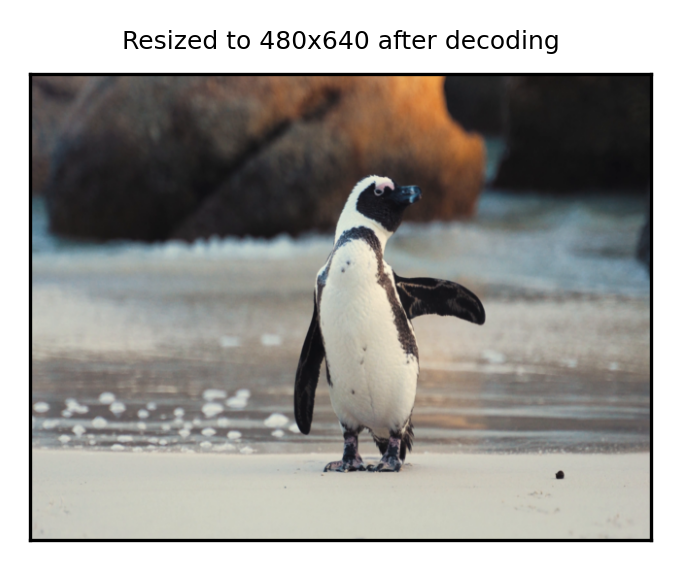
In the example above, full_decoder returns a video frame that has the
dimensions (2160, 3840) which is then resized down to (480, 640). But with the
transforms parameter of VideoDecoder we can
specify for the resize to happen during decoding!
resize_decoder = VideoDecoder(
    penguin_video_path,
    transforms=[v2.Resize(size=(480, 640))]
)
resized_during = resize_decoder[5]

plot(resized_during, title="Resized to 480x640 during decoding")
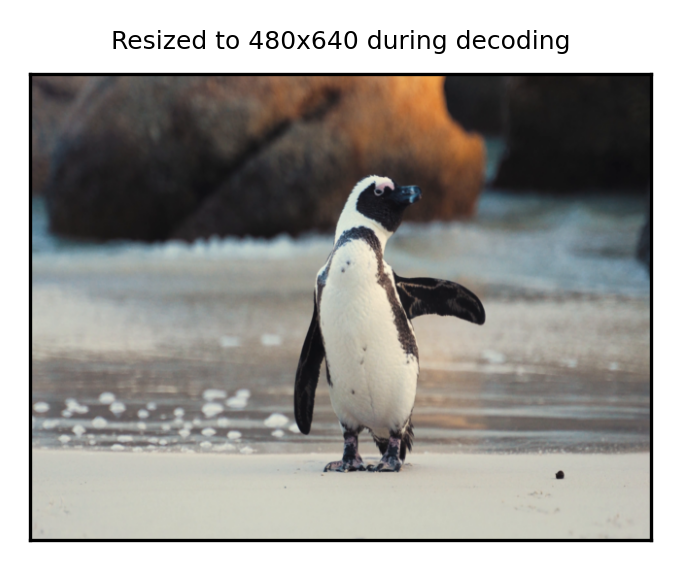
Importantly, the two frames are not identical, even though we can see they look very similar:
abs_diff = (resized_after.float() - resized_during.float()).abs()
(abs_diff == 0).all()
tensor(False)
But they’re close enough that models won’t be able to tell a difference:
assert (abs_diff <= 1).float().mean() >= 0.998
TorchCodec’s relationship to TorchVision transforms#
Notably, in our examples we are passing in TorchVision
Transform objects as our transforms.
However, VideoDecoder accepts TorchVision
transforms as a matter of convenience. TorchVision is not required to use
decoder transforms.
Every TorchVision transform that VideoDecoder accepts
has a complementary transform defined in torchcodec.transforms. We
would have gotten the same results if we had passed in the
torchcodec.transforms.Resize object that is a part of TorchCodec.
VideoDecoder accepts both objects as a matter of
convenience and to clarify the relationship between the transforms that TorchCodec
applies and the transforms that TorchVision offers.
While VideoDecoder accepts TorchVision transforms as
specifications, it is not actually using the TorchVision implementation of these
transforms. Instead, it is mapping them to equivalent
FFmpeg filters. That is,
torchvision.transforms.v2.Resize and torchcodec.transforms.Resize are mapped to
scale; and
torchvision.transforms.v2.CenterCrop and torchcodec.transforms.CenterCrop are mapped to
crop.
The relationships we ensure between TorchCodec DecoderTransform objects
and TorchVision Transform objects are:
The names are the same.
Default behaviors are the same.
The parameters for the
DecoderTransformobject are a subset of the TorchVisionTransformobject.Parameters with the same name control the same behavior and accept a subset of the same types.
The difference between the frames returned by a decoder transform and the complementary TorchVision transform are such that a model should not be able to tell the difference.
Note
Applying the exact same transforms during training and inference is
important for model perforamnce. For example, if you use decoder
transforms to resize frames during training, you should also use decoder
transforms to resize frames during inference. We provide the similarity
guarantees to mitigate the harm when the two techniques are
unintentionally mixed. That is, if you use decoder transforms to resize
frames during training, but use TorchVisions’s
Resize during inference, our guarantees
mitigate the harm to model performance. But we reccommend against this kind of
mixing.
It is appropriate and expected to use some decoder transforms and some TorchVision transforms, as long as the exact same pre-processing operations are performed during training and inference.
Decoder transform pipelines#
So far, we’ve only provided a single transform to the transform parameter to
VideoDecoder. But it
actually accepts a list of transforms, which become a pipeline of transforms.
The order of the list matters: the first transform in the list will receive
the originally decoded frame. The output of that transform becomes the input
to the next transform in the list, and so on.
From now on, we’ll use TorchCodec transforms instead of TorchVision
transforms. When passed to the VideoDecoder,
they behave identically.
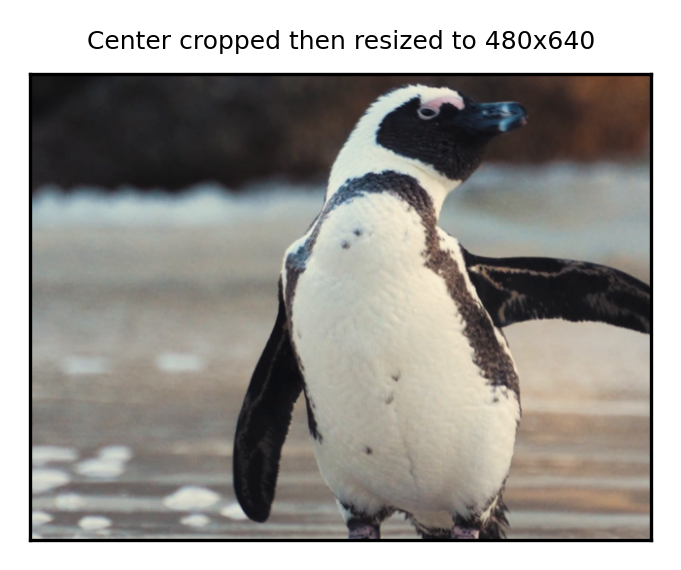
A simple example:
from torchcodec.transforms import Resize, CenterCrop


crop_resize_decoder = VideoDecoder(
    penguin_video_path,
    transforms = [
        CenterCrop(size=(1280, 1664)),
        Resize(size=(480, 640)),
    ]
)
crop_resized_during = crop_resize_decoder[5]
plot(crop_resized_during, title="Center cropped then resized to 480x640")
Performance: memory efficiency and speed#
The main motivation for decoder transforms is memory efficiency, particularly when applying transforms that reduce the size of a frame, such as resize and crop. Because the FFmpeg layer knows all of the transforms it needs to apply during decoding, it’s able to efficiently reuse memory. Further, full resolution frames are never returned to the Python layer. As a result, there is significantly less total memory needed and less pressure on the Python garbage collector.
In benchmarks reducing frames from (1080, 1920) down to (135, 240), we have observed a reduction in peak resident set size from 4.3 GB to 0.4 GB.
There is sometimes a runtime benefit, but it is dependent on the number of
threads that the VideoDecoder tells FFmpeg
to use. We define the following benchmark function, as well as the functions
to benchmark:
def bench(f, average_over=3, warmup=1, **f_kwargs):
    for _ in range(warmup):
        f(**f_kwargs)

    times = []
    for _ in range(average_over):
        start_time = perf_counter_ns()
        f(**f_kwargs)
        end_time = perf_counter_ns()
        times.append(end_time - start_time)

    times = torch.tensor(times) * 1e-6  # ns to ms
    times_std = times.std().item()
    times_med = times.median().item()
    return f"{times_med = :.2f}ms +- {times_std:.2f}"


from torchcodec import samplers


def sample_decoder_transforms(num_threads: int):
    decoder = VideoDecoder(
        penguin_video_path,
        transforms = [
            CenterCrop(size=(1280, 1664)),
            Resize(size=(480, 640)),
        ],
        seek_mode="approximate",
        num_ffmpeg_threads=num_threads,
    )
    transformed_frames = samplers.clips_at_regular_indices(
        decoder,
        num_clips=1,
        num_frames_per_clip=200
    )
    assert len(transformed_frames.data[0]) == 200


def sample_torchvision_transforms(num_threads: int):
    if num_threads > 0:
        torch.set_num_threads(num_threads)
    decoder = VideoDecoder(
        penguin_video_path,
        seek_mode="approximate",
        num_ffmpeg_threads=num_threads,
    )
    frames = samplers.clips_at_regular_indices(
        decoder,
        num_clips=1,
        num_frames_per_clip=200
    )
    transforms = v2.Compose(
        [
            v2.CenterCrop(size=(1280, 1664)),
            v2.Resize(size=(480, 640)),
        ]
    )
    transformed_frames = transforms(frames.data)
    assert transformed_frames.shape[1] == 200
When the VideoDecoder object sets the number of
FFmpeg threads to 0, that tells FFmpeg to determine how many threads to use
based on what is available on the current system. In such cases, decoder transforms
will tend to outperform getting back a full frame and applying TorchVision transforms
sequentially:
print(f"decoder transforms:    {bench(sample_decoder_transforms, num_threads=0)}")
print(f"torchvision transform: {bench(sample_torchvision_transforms, num_threads=0)}")
decoder transforms:    times_med = 1954.10ms +- 16.10
torchvision transform: times_med = 4054.39ms +- 147.19
The reason is that FFmpeg is applying the decoder transforms in parallel. However, if the number of threads is 1 (as is the default), then there is often less benefit to using decoder transforms. Using the TorchVision transforms may even be faster!
print(f"decoder transforms:    {bench(sample_decoder_transforms, num_threads=1)}")
print(f"torchvision transform: {bench(sample_torchvision_transforms, num_threads=1)}")
decoder transforms:    times_med = 10695.56ms +- 19.67
torchvision transform: times_med = 12461.22ms +- 11.48
In brief, our performance guidance is:
If you are applying a transform pipeline that signficantly reduces the dimensions of your input frames and memory efficiency matters, use decoder transforms.
If you are using multiple FFmpeg threads, decoder transforms may be faster. Experiment with your setup to verify.
If you are using a single FFmpeg thread, then decoder transforms may be slower. Experiment with your setup to verify.
Total running time of the script: (2 minutes 20.324 seconds)