Accelerated video decoding on GPUs with CUDA and NVDEC#
TorchCodec can use supported Nvidia hardware (see support matrix here) to speed-up video decoding. This is called “CUDA Decoding” and it uses Nvidia’s NVDEC hardware decoder and CUDA kernels to respectively decompress and convert to RGB. CUDA Decoding can be faster than CPU Decoding for the actual decoding step and also for subsequent transform steps like scaling, cropping or rotating. This is because the decode step leaves the decoded tensor in GPU memory so the GPU doesn’t have to fetch from main memory before running the transform steps. Encoded packets are often much smaller than decoded frames so CUDA decoding also uses less PCI-e bandwidth.
Installing TorchCodec with CUDA Enabled#
Refer to the installation guide in the README.
Checking if Pytorch has CUDA enabled#
Note
This tutorial requires FFmpeg libraries compiled with CUDA support.
import torch

print(f"{torch.__version__=}")
print(f"{torch.cuda.is_available()=}")
print(f"{torch.cuda.get_device_properties(0)=}")
torch.__version__='2.14.1+cu130'
torch.cuda.is_available()=True
torch.cuda.get_device_properties(0)=_CudaDeviceProperties(name='NVIDIA A10G', major=8, minor=6, total_memory=22587MB, multi_processor_count=80, uuid=3e7ddce1-f83c-31d0-8ff5-13f0bc13dadf, pci_bus_id=0, pci_device_id=30, pci_domain_id=0, L2_cache_size=6MB)
Downloading the video#
We will use the following video which has the following properties:
Codec: H.264
Resolution: 960x540
FPS: 29.97
Pixel format: YUV420P
import urllib.request

video_file = "video.mp4"
urllib.request.urlretrieve(
    "https://download.pytorch.org/torchaudio/tutorial-assets/stream-api/NASAs_Most_Scientifically_Complex_Space_Observatory_Requires_Precision-MP4_small.mp4",
    video_file,
)
('video.mp4', <http.client.HTTPMessage object at 0x7f249d2afcd0>)
CUDA Decoding using VideoDecoder#
To use CUDA decoder, you need to pass in a cuda device to the decoder.
from torchcodec.decoders import VideoDecoder

decoder = VideoDecoder(video_file, device="cuda")
frame = decoder[0]
The video frames are decoded and returned as tensor of NCHW format.
print(frame.shape, frame.dtype)
torch.Size([3, 540, 960]) torch.uint8
The video frames are left on the GPU memory.
print(frame.data.device)
cuda:0
Checking for CPU Fallback#
In some cases, CUDA decoding may fall back to CPU decoding. This can happen
when the video codec or format is not supported by the NVDEC hardware decoder, or when NVCUVID wasn’t found.
TorchCodec provides the CpuFallbackStatus class
to help you detect when this fallback occurs.
You can access the fallback status via the
cpu_fallback attribute:
decoder = VideoDecoder(video_file, device="cuda")

# Check and print the CPU fallback status
print(decoder.cpu_fallback)
[CUDA] Fallback status: No fallback required
Visualizing Frames#
Let’s look at the frames decoded by CUDA decoder and compare them against equivalent results from the CPU decoders.
timestamps = [12, 19, 45, 131, 180]
cpu_decoder = VideoDecoder(video_file, device="cpu")
cuda_decoder = VideoDecoder(video_file, device="cuda")
cpu_frames = cpu_decoder.get_frames_played_at(timestamps).data
cuda_frames = cuda_decoder.get_frames_played_at(timestamps).data


def plot_cpu_and_cuda_frames(cpu_frames: torch.Tensor, cuda_frames: torch.Tensor):
    try:
        import matplotlib.pyplot as plt
        from torchvision.transforms.v2.functional import to_pil_image
    except ImportError:
        print("Cannot plot, please run `pip install torchvision matplotlib`")
        return
    n_rows = len(timestamps)
    fig, axes = plt.subplots(n_rows, 2, figsize=[12.8, 16.0])
    for i in range(n_rows):
        axes[i][0].imshow(to_pil_image(cpu_frames[i].to("cpu")))
        axes[i][1].imshow(to_pil_image(cuda_frames[i].to("cpu")))

    axes[0][0].set_title("CPU decoder", fontsize=24)
    axes[0][1].set_title("CUDA decoder", fontsize=24)
    plt.setp(axes, xticks=[], yticks=[])
    plt.tight_layout()


plot_cpu_and_cuda_frames(cpu_frames, cuda_frames)
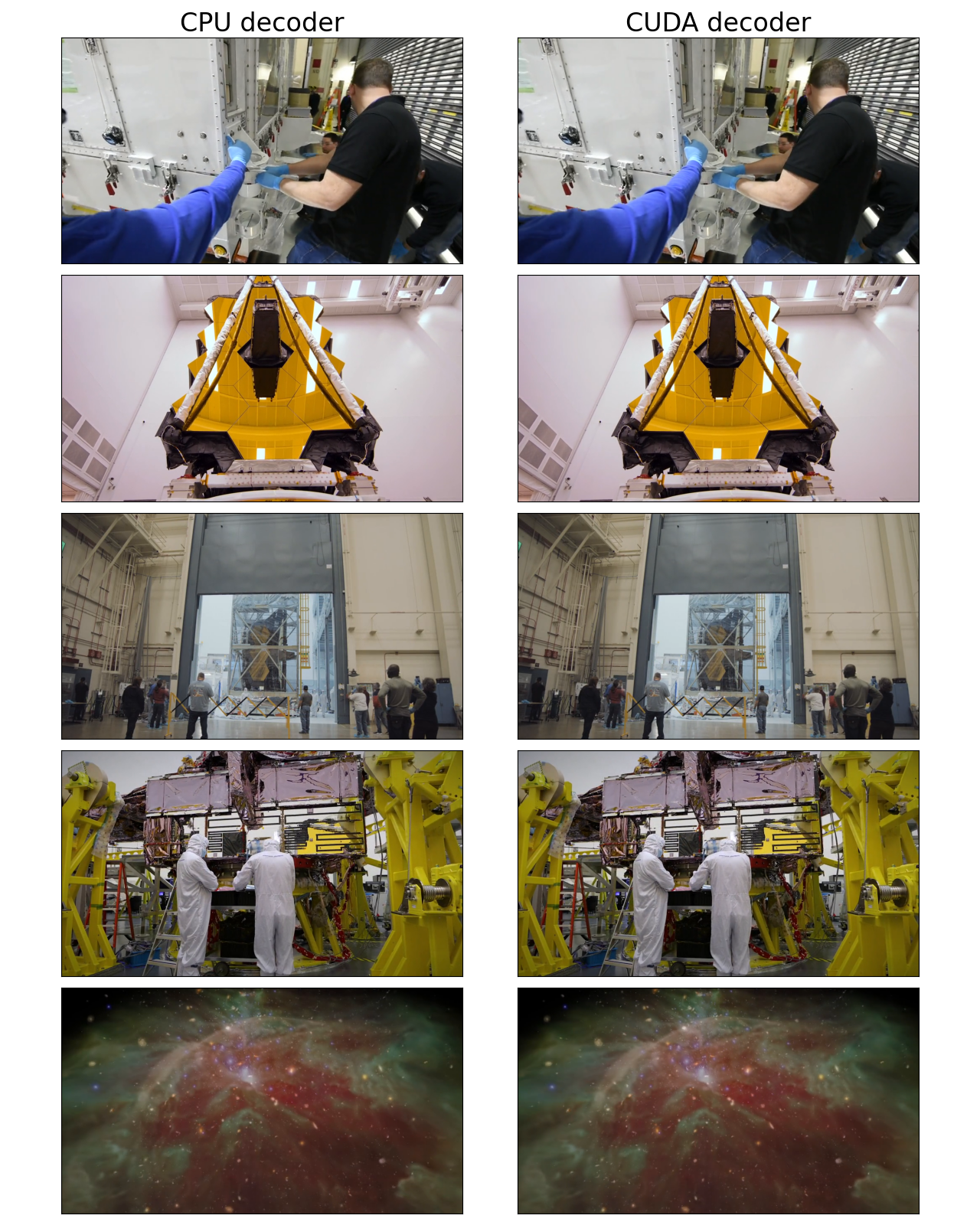
They look visually similar to the human eye but there may be subtle differences because CUDA math is not bit-exact with respect to CPU math.
frames_equal = torch.equal(cpu_frames.to("cuda"), cuda_frames)
mean_abs_diff = torch.mean(
    torch.abs(cpu_frames.float().to("cuda") - cuda_frames.float())
)
max_abs_diff = torch.max(torch.abs(cpu_frames.to("cuda").float() - cuda_frames.float()))
print(f"{frames_equal=}")
print(f"{mean_abs_diff=}")
print(f"{max_abs_diff=}")
frames_equal=False
mean_abs_diff=tensor(0.6004, device='cuda:0')
max_abs_diff=tensor(2., device='cuda:0')
Total running time of the script: (0 minutes 5.056 seconds)