Basic Concepts
Tip
This page covers the core TorchX abstractions – AppDef, Component, Runner, and Scheduler – and how they fit together. For a hands-on walkthrough, see the Quickstart Guide.
Project Structure
TorchX has three layers: define (what to run), launch (where to run it), and manage (monitor, log, cancel):
Module |
Purpose |
|---|---|
Application spec (job definition) APIs |
|
Predefined (builtin) app specs |
|
|
Handles patching images for remote execution |
CLI tool |
|
Submits app specs as jobs on a scheduler |
|
Backend job schedulers |
|
Utility libraries for authoring apps |
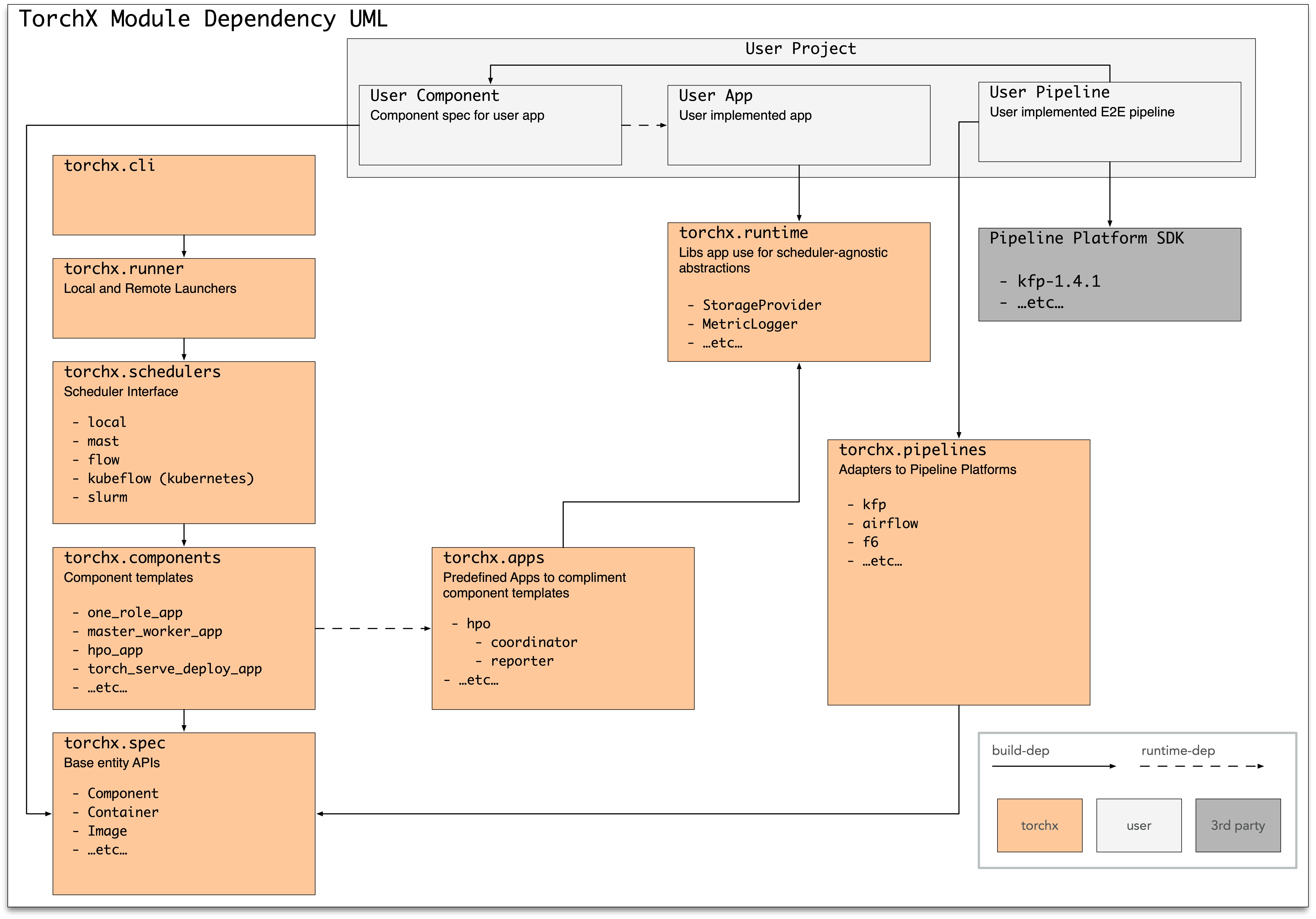
Concepts
AppDefs
An AppDef is a job definition — similar to a
Kubernetes spec.yaml or a scheduler JobDefinition. It’s a pure Python
dataclass understood by Runner.
import torchx.specs as specs

app = specs.AppDef(
    name="echo",
    roles=[
        specs.Role(
            name="echo",
            entrypoint="/bin/echo",
            image="/tmp",
            args=["hello world"],
        )
    ],
)
Multiple Role instances represent non-homogeneous
apps (e.g. coordinator + workers). Setting num_replicas > 1 runs multiple
identical copies (replicas) of a role – this is how you express distributed
jobs (e.g. multi-node training).
See the torchx.specs API docs for full details.
Components
A component is a factory function that returns an AppDef:
import torchx.specs as specs

def ddp(name: str, nnodes: int, image: str, entrypoint: str, *args: str) -> specs.AppDef:
    return specs.AppDef(
        name=name,
        roles=[
            specs.Role(
                name="trainer",
                entrypoint=entrypoint,
                image=image,
                resource=specs.Resource(cpu=4, gpu=1, memMB=1024),
                args=list(args),
                num_replicas=nnodes,
            )
        ],
    )
Components are cheap — create one per use case rather than over-generalizing. Browse the builtin components library before writing your own.
Runner and Schedulers
The Runner submits AppDefs as jobs. Use it from
the CLI or from Python – both are first-class interfaces:
CLI:
torchx run --scheduler local_cwd my_component.py:ddp
Python API:
from torchx.runner import get_runner

with get_runner() as runner:
    # Option 1: run a named component (same resolution as the CLI)
    app_handle = runner.run_component(
        "dist.torchrun", ["--script", "train.py"], scheduler="kubernetes",
    )

    # Option 2: run an AppDef you built directly
    app_handle = runner.run(app, scheduler="kubernetes")

    # Monitor the job
    status = runner.status(app_handle)      # poll current state
    final = runner.wait(app_handle)          # block until terminal
    runner.cancel(app_handle)                # request cancellation

    # Fetch logs for replica 0 of the "trainer" role
    for line in runner.log_lines(app_handle, "trainer", k=0):
        print(line, end="")
The app_handle returned by run/run_component is a URI string:
{scheduler}://{session_name}/{app_id} (e.g.
kubernetes://torchx/my_job_123). Pass it to status, wait,
cancel, log_lines, and delete.
See Schedulers for supported backends and the API Quick Reference for complete recipes.
Runtime
Important
torchx.runtime is optional. Your application binary has zero
dependency on TorchX.
For portable apps, use fsspec for storage abstraction:
import fsspec

def main(input_url: str):
    with fsspec.open(input_url, "rb") as f:
        data = torch.load(f, weights_only=True)
This works with s3://, gs://, file://, and other backends.
When to Use TorchX (and When Not To)
TorchX is a good fit when you launch PyTorch jobs across multiple backends without maintaining separate configurations for each:
You need portable job definitions that work the same way on a laptop, an HPC cluster, and a cloud provider.
You need distributed training with TorchElastic and a single command to launch multi-node jobs on any scheduler.
You prefer Python-native job definitions over YAML and want to launch jobs programmatically from scripts, notebooks, or pipelines.
TorchX focuses on job launching and lifecycle management. It does not include workflow orchestration (DAGs), hyperparameter search, or a model registry – integrate with Airflow, Kubeflow Pipelines, or MLflow for those.
TorchX vs. alternatives:
Alternative |
When to use it instead |
|---|---|
|
You only need distributed training on a single cluster and already
have nodes allocated (e.g. via |
Direct Kubernetes YAML |
You are Kubernetes-only and prefer managing manifests directly. |
AWS SageMaker SDK |
You are all-in on AWS and want tight integration with SageMaker features (spot training, model registry, endpoints). |
Kubeflow Training Operator |
You need Kubernetes-native CRDs (PyTorchJob, TFJob) with gang
scheduling or priority queues. TorchX creates vanilla |
Custom shell scripts |
You have a single environment with stable infrastructure. TorchX pays off with multiple environments or teams needing reproducible launches. |
- AppDef
A
AppDefis a job definition containing one or more Roles. It is the primary unit that the Runner submits to a Scheduler.- Role
A
Roledescribes a set of identical containers (replicas) within an AppDef. Roles specify the entrypoint, image, arguments, and resource requirements.- Resource
A
Resourcespecifies the hardware requirements (CPU, GPU, memory) for a Role. Named resources provide t-shirt-sized presets.- Component
A Python function that returns an
AppDef. Components are the recommended way to define reusable, shareable job specifications.- Runner
The
Runnersubmits AppDefs as jobs to a Scheduler and manages their lifecycle.- Scheduler
A backend that executes jobs (e.g. Kubernetes, Slurm, local Docker). See Schedulers for the full list.
- Workspace
A local directory containing your source code. TorchX can automatically patch (overlay) your workspace onto a base image so that remote jobs run your latest code without a manual image rebuild. See torchx.workspace.
- Image
The base runtime environment for a job. For container-based schedulers (
local_docker,kubernetes) this is a Docker container image. Forlocal_cwdandslurmit is the current working directory or shared filesystem path.- Dryrun
A preview of what TorchX would submit to a scheduler without actually submitting. Useful for debugging job definitions. The Runner’s
dryrun()method returns anAppDryRunInfocontaining the native request.- AppHandle
A URI string returned by
run()with the format{scheduler}://{session_name}/{app_id}(e.g.kubernetes://torchx/my_job_123). Passed tostatus,wait,cancel,log_lines, anddelete. Seeparse_app_handle().- Entry Point
A standard Python packaging mechanism that lets installed packages advertise plugins. TorchX uses entry points to discover schedulers, components, trackers, and CLI commands at runtime. Defined in
setup.pyorpyproject.toml. See the packaging guide.
Next Steps
If you haven’t already, work through the Quickstart Guide.
Explore the Runner Python API for launching jobs programmatically.
Write your first reusable job template in Custom Components.
Register components, schedulers, and resources as plugins in Advanced Usage.
See also
- Custom Components
Step-by-step guide for writing and launching a custom component.
- Advanced Usage
Extending TorchX with custom schedulers, resources, and components.