torchx.schedulers
Tip
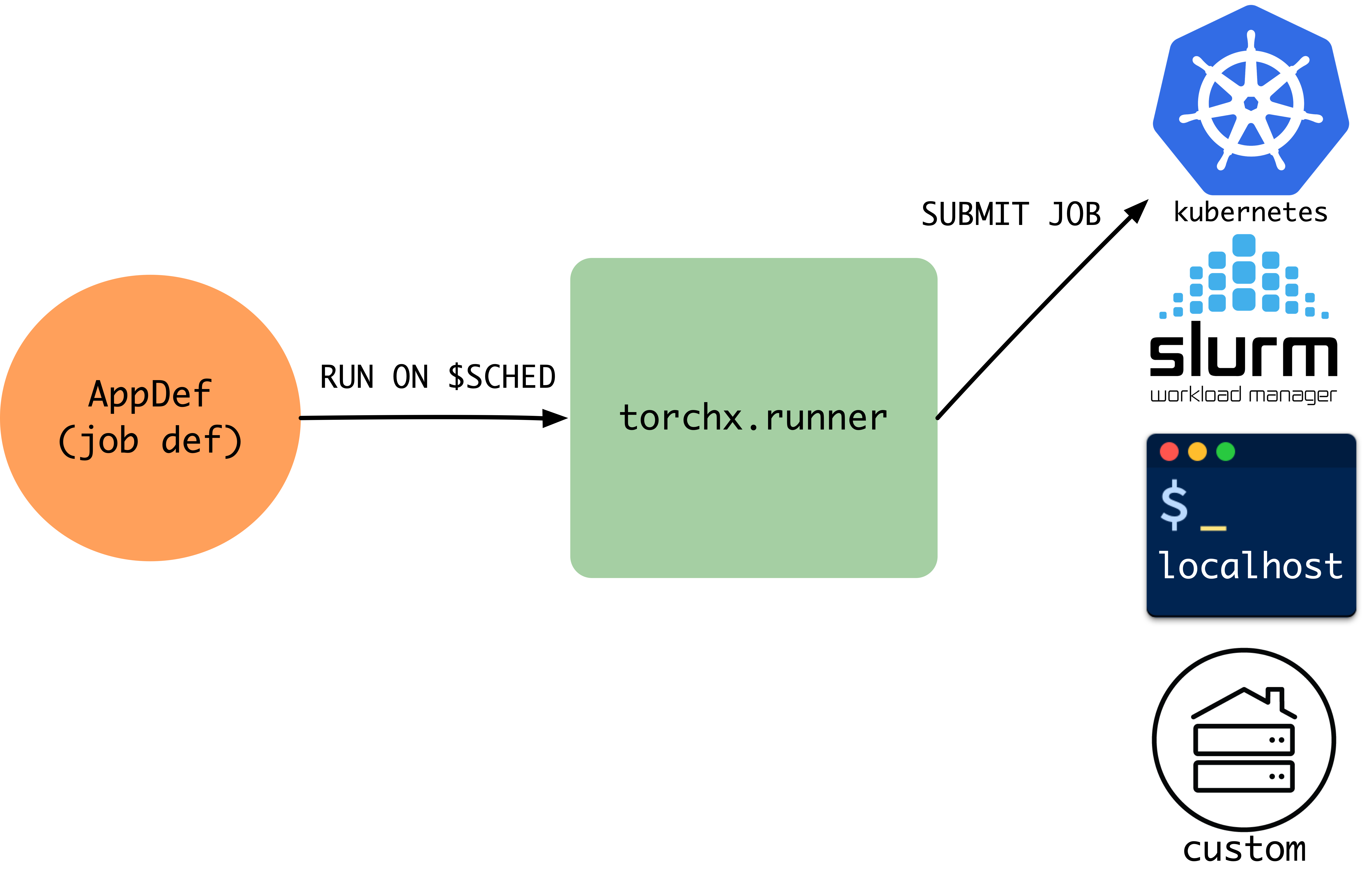
Schedulers translate portable AppDefs into backend-specific jobs. This page covers the built-in schedulers, the custom scheduler interface, and config options (StructuredOpts vs runopts).
Each scheduler translates a scheduler-agnostic
AppDef into a native job format (Kubernetes Job,
Slurm sbatch, etc.) and manages the job lifecycle. Because the
interface is pluggable, you switch backends without changing application code.
TorchX ships with schedulers for:
Local development:
local_cwd,local_dockerHPC (High-Performance Computing) clusters:
slurmCloud / container orchestrators:
kubernetes
Need a scheduler that isn’t listed? See Implementing a Custom Scheduler below and Registering Custom Schedulers for plugin registration.
Choosing a Scheduler
Every scheduler accepts the same AppDef; only the --scheduler flag
(CLI) or scheduler= argument (Python API) changes.
Scheduler |
Environment |
What it produces |
Best for |
|---|---|---|---|
|
Your laptop / devserver |
Local process ( |
Rapid iteration. No containers, no cluster access needed. |
|
Local Docker daemon |
Docker container with patched image |
Testing container behavior locally before deploying to a cluster. |
|
Kubernetes cluster |
Kubernetes |
Production workloads on Kubernetes. Requires cluster access and a container registry. |
|
Slurm HPC cluster |
|
Traditional HPC environments. Uses the shared filesystem as the workspace (no container build needed). |
Implementing a Custom Scheduler
Subclass Scheduler and implement the
abstract methods. Scheduler is generic over a config type T (typically
Mapping[str, CfgVal]) that flows through to _submit_dryrun. A
dryrun builds the scheduler-native request without submitting
– returning an AppDryRunInfo wrapping your native
request type (e.g. a Kubernetes V1Job, a Slurm sbatch script).
The submission flow is:
Runner.run(app, scheduler, cfg)
    │
    ▼
Runner.dryrun(app, scheduler, cfg)
    │
    ├── resolve cfg from .torchxconfig + overrides
    ├── build workspace (if WorkspaceMixin)
    │
    ▼
Scheduler.submit_dryrun(app, cfg)
    │
    ├── Scheduler._submit_dryrun(app, cfg)
    │       └── translate AppDef + cfg ──► native request (e.g. V1Job, sbatch)
    ├── run Role.pre_proc hooks (per role, in order)
    │
    ▼
AppDryRunInfo[NativeRequest]
    │
    ▼
Runner.schedule(dryrun_info)
    │
    ▼
Scheduler.schedule(dryrun_info)
    │
    ├── submit native request to backend
    │
    ▼
app_id (str)
After submission, the Runner can query the job via Scheduler.describe,
stream logs via Scheduler.log_iter, or cancel via
Scheduler._cancel_existing.
Method Reference
Method |
Required |
Purpose |
|---|---|---|
|
Yes |
Translate an |
|
Yes |
Submit the native request and return the scheduler-assigned |
|
Yes |
Query job status. Return |
|
Yes |
List jobs visible to this scheduler. |
|
Yes |
Cancel a running job (called only if the job exists). |
|
No |
Declare scheduler-specific config options (see
|
|
No |
Stream log lines. Default raises |
|
No |
Pre-workspace-build validation hook. Called before workspace building. Override to reject invalid configs early. |
|
No |
Post-workspace-build validation hook. The default implementation checks that every role has a non-null resource. |
|
No |
Delete a job definition from the scheduler’s data plane. Default
delegates to |
|
No |
Release local resources. Default is a no-op. |
Minimal Skeleton
from dataclasses import dataclass
from typing import Any, Mapping

from torchx.schedulers.api import (
    DescribeAppResponse,
    ListAppResponse,
    Scheduler,
    StructuredOpts,
)
from torchx.specs import AppDef, AppDryRunInfo, CfgVal, runopts


# 1. Define your native request type
@dataclass
class MyRequest:
    job_name: str
    cmd: list[str]
    env: dict[str, str]


# 2. (Optional) Define typed config via StructuredOpts
@dataclass
class MyOpts(StructuredOpts):
    cluster: str = "default"
    """Name of the cluster to submit to."""

    queue: str = "gpu"
    """Queue / partition for the job."""


# 3. Implement the Scheduler
class MyScheduler(Scheduler[Mapping[str, CfgVal]]):

    def __init__(self, session_name: str, **kwargs: object) -> None:
        super().__init__("my_backend", session_name)

    def _run_opts(self) -> runopts:
        return MyOpts.as_runopts()

    def _submit_dryrun(
        self, app: AppDef, cfg: Mapping[str, CfgVal]
    ) -> AppDryRunInfo[MyRequest]:
        opts = MyOpts.from_cfg(cfg)
        role = app.roles[0]
        request = MyRequest(
            job_name=app.name,
            cmd=[role.entrypoint, *role.args],
            env=dict(role.env),
        )
        return AppDryRunInfo(request, repr)

    def schedule(self, dryrun_info: AppDryRunInfo[MyRequest]) -> str:
        request: MyRequest = dryrun_info.request
        # ... submit to your backend ...
        return "my-backend-job-id-123"

    def describe(self, app_id: str) -> DescribeAppResponse | None:
        # ... query your backend ...
        return DescribeAppResponse(app_id=app_id)

    def list(
        self, cfg: Mapping[str, CfgVal] | None = None
    ) -> list[ListAppResponse]:
        # ... list jobs ...
        return []

    def _cancel_existing(self, app_id: str) -> None:
        # ... cancel the job ...
        pass


# 4. Register the scheduler
from torchx.plugins import register

@register.scheduler()
def create_scheduler(session_name: str, **kwargs: Any) -> MyScheduler:
    return MyScheduler(session_name)
Place the module in a torchx_plugins/schedulers/ namespace package and
pip install it. TorchX discovers the scheduler automatically.
See Registering Custom Schedulers for the full guide, including the legacy entry-point approach.
Legacy: entry points (deprecated)
[project.entry-points."torchx.schedulers"]
my_backend = "my_package.scheduler:create_scheduler"
Testing Your Scheduler
Study torchx/schedulers/test/api_test.py for the canonical test patterns.
A minimal test creates the scheduler, calls submit_dryrun with a test
AppDef, and asserts the native request is correct:
import unittest
from torchx.specs import AppDef, Role, Resource

class MySchedulerTest(unittest.TestCase):
    def setUp(self) -> None:
        self.scheduler = MyScheduler(session_name="test")

    def test_submit_dryrun(self) -> None:
        app = AppDef(
            name="test_app",
            roles=[Role(name="worker", image="img", entrypoint="echo",
                        args=["hello"], resource=Resource(cpu=1, gpu=0, memMB=512))],
        )
        dryrun_info = self.scheduler.submit_dryrun(app, cfg={"cluster": "test"})
        request = dryrun_info.request
        self.assertEqual(request.job_name, "test_app")

    def test_run_opts(self) -> None:
        opts = self.scheduler.run_opts()
        self.assertIn("cluster", {name for name, _ in opts})
Common Pitfalls
Forgetting ``super().__init__()``: Always call
super().__init__("my_backend", session_name)in your__init__. Thebackendstring is used by the Runner to constructAppHandlestrings (my_backend://session/app_id). Omitting it causes opaque errors when the Runner tries to route calls.Missing the factory function: The entry point must point to a factory function (
def create_scheduler(session_name: str, **kwargs: object) -> Scheduler), not the class itself. The Runner calls this factory withsession_nameand optional**kwargs.Returning the wrong type from ``_submit_dryrun``: The second argument to
AppDryRunInfo(request, repr_fn)is a callable that renders the request fortorchx run --dryrun. Passrepror a custom formatter – do not omit it.Not handling ``cfg=None`` in ``list()``: The
listmethod receivescfg=Nonewhen called without config. Guard againstNonebefore accessing config keys.
Config Options (StructuredOpts vs runopts)
Two approaches for declaring scheduler config:
StructuredOpts (recommended) — define a
@dataclasssubclass. Fields become typed config options with auto-generated help text from docstrings:@dataclass class MyOpts(StructuredOpts): cluster: str = "default" """Name of the cluster to submit to.""" queue: str = "gpu" """Queue / partition for the job.""" # In your scheduler: def _run_opts(self) -> runopts: return MyOpts.as_runopts() def _submit_dryrun(self, app, cfg): opts = MyOpts.from_cfg(cfg) # typed access: opts.cluster, opts.queue
Manual runopts — build the options imperatively:
def _run_opts(self) -> runopts:
    opts = runopts()
    opts.add("cluster", type_=str, default="default", help="Cluster name")
    opts.add("queue", type_=str, default="gpu", help="Queue / partition")
    return opts
Adding Workspace Support
To support automatic image patching, inherit from a
WorkspaceMixin alongside Scheduler:
from torchx.workspace.docker_workspace import DockerWorkspaceMixin

class MyScheduler(DockerWorkspaceMixin, Scheduler[Mapping[str, CfgVal]]):
    def __init__(self, session_name: str, **kwargs: object) -> None:
        super().__init__("my_backend", session_name)
    # ... rest of scheduler methods ...
TorchX ships two workspace mixins:
DockerWorkspaceMixin (for
container-based schedulers like Kubernetes) and
DirWorkspaceMixin (for
shared-filesystem schedulers like Slurm). You can also subclass
WorkspaceMixin directly for custom strategies.
See torchx.workspace for the full workspace API, built-in mixin reference, and a guide to implementing your own workspace mixin.
Existing Implementations
Study these for real-world patterns:
torchx.schedulers.local_scheduler— usesStructuredOpts, no workspace mixin, runs jobs viasubprocess.Popentorchx.schedulers.slurm_scheduler— usesDirWorkspaceMixin, generatessbatchscriptstorchx.schedulers.kubernetes_scheduler— usesDockerWorkspaceMixin, creates KubernetesV1Jobresources
All Schedulers
Scheduler Functions
- torchx.schedulers.get_scheduler_factories(*, skip_defaults: bool = False) dict[str, SchedulerFactory][source]
get_scheduler_factories returns all the available schedulers names and the method to instantiate them: the built-ins plus everything registered through
torchx.plugins, which wins a name clash.The first scheduler in the dictionary is used as the default scheduler, and registered plugins come first.
Pass
skip_defaults=Truefor the registered plugins only.
Scheduler Classes
- class torchx.schedulers.api.Scheduler(backend: str, session_name: str)[source]
Abstract base class for job schedulers.
Implementors must override all
@abc.abstractmethodmethods. SeeStructuredOptsfor typed config andtorchx.schedulersfor built-in implementations.The type argument is the scheduler’s config type. Name a
StructuredOptssubclass there and everycfgthis scheduler is handed arrives as that dataclass, already converted.- cancel(app_id: str) None[source]
Cancels the app. Idempotent — safe to call multiple times.
Does not block. Use
wait()to await the terminal state.
- close() None[source]
Releases local resources. Safe to call multiple times.
Only override for schedulers with local state (e.g.
local_scheduler).
- delete(app_id: str) None[source]
Deletes the job definition from the scheduler’s data-plane.
On schedulers with persistent job definitions (e.g. Kubernetes), this purges the definition. On others (e.g. Slurm), this is equivalent to
cancel(). Calling on a live job cancels it first.
- abstractmethod describe(app_id: str) DescribeAppResponse | None[source]
Returns app description, or
Noneif it no longer exists.
- describe_native(app_id: str) AppDryRunInfo | None[source]
Returns the scheduler-native request of an already-submitted app.
The read-side twin of
submit_dryrun(): reads the request back from the scheduler, wrapped in the sameAppDryRunInfo(same scheduler-specificrequesttype). Unlikedescribe(), which lossily maps the job description ontoAppDef, the returnedrequestpreserves scheduler-specific fields with noAppDefequivalent. Theapp/cfgback-references are populated only where the scheduler retains them.Returns
Noneif this scheduler does not implement native read-back (the default) or if the app no longer exists.
- abstractmethod list(cfg: Mapping[str, str | int | float | bool | list[str] | dict[str, str] | None] | None = None) List[ListAppResponse][source]
Lists jobs on this scheduler.
- log_iter(app_id: str, role_name: str, k: int = 0, regex: str | None = None, since: datetime | None = None, until: datetime | None = None, should_tail: bool = False, streams: Stream | None = None) Iterable[str][source]
Returns an iterator over log lines for the
k-th replica ofrole_name.Important
Not all schedulers support log iteration, tailing, or time-based cursors. Check the specific scheduler docs.
Lines include trailing whitespace (
\n). Whenshould_tail=True, the iterator blocks until the app reaches a terminal state.- Parameters:
k – replica (node) index
regex – optional filter pattern
since – start cursor (scheduler-dependent)
until – end cursor (scheduler-dependent)
should_tail – if
True, follow output liketail -fstreams –
stdout,stderr, orcombined
- Raises:
NotImplementedError – if the scheduler does not support log iteration
- run_opts() runopts[source]
Returns accepted run configuration options (
torchx runopts <scheduler>).
- abstractmethod schedule(dryrun_info: AppDryRunInfo) str[source]
Submits a previously dry-run request. Returns the app_id.
- submit(app: AppDef, cfg: T, workspace: str | Workspace | None = None) str[source]
Submits an app directly. Prefer
run()for production use.Mutates app: unlike
run(), no copy is taken, so every write lands on the caller’s own object. Passing workspace setsapp.roles[0].workspaceand repointsapp.roles[*].imageat the build; without it nothing is built, and a role carrying its ownworkspacereaches_submit_dryrun()unbuilt.- Raises:
ValueError – workspace was passed but this scheduler is not a
WorkspaceMixin.
- submit_dryrun(app: AppDef, cfg: T) AppDryRunInfo[Any, T][source]
Returns the scheduler request without submitting.
No copy is taken: the returned
appis the app passed in, and_submit_dryrun()and each role’spre_procmay mutate it. Callers wanting theirAppDefleft alone should go throughdryrun(), which copies first.cfgis cfg with this scheduler’srun_opts()defaults applied and converted to the scheduler’s config type, so it is not necessarily what was passed in.
- class torchx.schedulers.api.StructuredOpts(*, _extra_cfg: dict[str, str | int | float | bool | list[str] | dict[str, str] | None] = <factory>)[source]
Base class for typed scheduler configuration options.
Provides a type-safe way to define scheduler run options as dataclass fields instead of manually building
runopts. Subclasses should be@dataclassdecorated with fields representing config options.- Features:
Auto-generates
runoptsfrom dataclass fields viaas_runopts()Parses raw config dicts into typed instances via
from_cfg()Supports snake_case field names with camelCase aliases
Field metadata
cfg_keyoverrides the external config key for names that cannot be field names (e.g. hyphenatedmail-user):mail_user: str | None = field(default=None, metadata={"cfg_key": "mail-user"})Extracts help text from field docstrings
Supports nested
StructuredOptsfields, flattened with dot-prefixed keys (e.g.,k8s.context)
Example
>>> from dataclasses import dataclass
>>> from torchx.schedulers.api import StructuredOpts
>>>
>>> @dataclass
... class MyOpts(StructuredOpts):
...     cluster_name: str
...     '''Name of the cluster to submit to.'''
...
...     num_retries: int = 3
...     '''Number of retry attempts.'''
...
>>> # Use in scheduler:
>>> # def _run_opts(self) -> runopts:
>>> #     return MyOpts.as_runopts()
>>> #
>>> # def _submit_dryrun(self, app, cfg):
>>> #     opts = MyOpts.from_cfg(cfg)
>>> #     # opts.cluster_name, opts.num_retries are typed
- classmethod as_runopts() runopts[source]
Build
runoptsfrom dataclass fields.Nested
StructuredOptsfields are flattened with dot-prefixed keys (e.g., fieldk8s: K8sOptswith sub-fieldcontextbecomesk8s.context).
- classmethod from_cfg(cfg: Mapping[str, str | int | float | bool | list[str] | dict[str, str] | None]) Self[source]
Create an instance from a raw config dict.
Fields are snake_case but also accept camelCase aliases (e.g.,
hpc_identitycan be set viahpcIdentity). A field passed under two spellings with conflicting values raisesInvalidRunConfigException; equal values collapse into one. NestedStructuredOptsfields are reconstructed from dot-prefixed keys (e.g.,k8s.context).
- class torchx.schedulers.api.DescribeAppResponse(app_id: str = '<NOT_SET>', state: ~torchx.specs.api.AppState = UNSUBMITTED (0), num_restarts: int = -1, msg: str = '<NONE>', structured_error_msg: str = '<NONE>', ui_url: str | None = None, metadata: dict[str, str] = <factory>, roles_statuses: ~typing.List[~torchx.specs.api.RoleStatus] = <factory>, roles: ~typing.List[~torchx.specs.api.Role] = <factory>)[source]
Response from
Scheduler.describe(). Contains status, roles, and metadata.
- class torchx.schedulers.api.ListAppResponse(app_id: str, state: AppState, app_handle: str = '<NOT_SET>', name: str = '')[source]
Response from
Scheduler.list()/list().
See also
- Advanced Usage
Registering custom schedulers, resources, and components.
- torchx.plugins
Plugin API reference (
@register,find(),PluginRegistry).- torchx.workspace
Workspace API reference and custom workspace mixin guide.
- Quick Reference
Single-page reference for users of TorchX (imports, types, and recipes).